

Windscribe is a Windows utility that helps you protect your privacy while you're browsing the web. This program encrypts the data you receive and send over the Internet and makes sure no unauthorized users can access your private information, like passwords, email accounts, browser history, and many others.
The application is also capable of blocking ads on your PC, lets you access geo-restricted websites, and bypass the restrictions imposed by your ISP (Internet Service Provider).
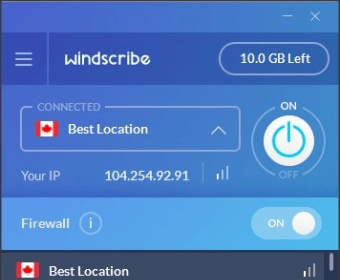
Windscribe enables you to create a VPN (Virtual Private Network) between your computer and a remote server. Simply log in to your Windscribe account (you can create one on the homepage of the developer), select the preferred remote server, and let the program worry for the rest.
In my testing, the app worked flawlessly. It was very simple to configure and immediately connected to the selected remote server. Furthermore, it didn't use many CPU resources while operating in the background.
My only problem with this program is that you need to install a browser extension in order to block ads and generate and manage secure links.
Other than that, nothing bad can be said about this utility. You can test the app to see how it works without paying a buck. The program lets you use up to 10GB of data, afterwards, if you're happy with the results, you can choose one of the payment options from the homepage of the developer.

















Comments (22)